Program Overview
TrackER is a healthcare queue management system used in hospital emergency departments. We send automated SMS text messages to patients, family members, and hospital employees to provide real-time updates about emergency room visits and critical safety alerts.
Program Summary
- Program Name: TrackER Emergency Room Notifications
- Program Operator: CCB Tech — Chartiers Creek Business Holdings, Canonsburg, PA
- Message Types: Real-time ER visit status updates, discharge notifications, staff safety alerts, security notifications, and multi-factor authentication codes
- Message Frequency: Varies; typically 3–15 messages per emergency room visit for patients, and as-needed for staff safety alerts
- Message & Data Rates May Apply. Standard text messaging rates from your mobile carrier apply
- Opt-Out: Reply STOP at any time to unsubscribe
- Help: Reply HELP for support information
How Consent Is Collected (Opt-In Process)
TrackER collects explicit, affirmative consent before sending any SMS messages. Consent is collected at the point of phone number collection through the following methods:
Method 1: Self-Service Kiosk (Primary)
When a patient checks in at the TrackER kiosk in the hospital emergency room:
- The patient enters their personal information including mobile phone number
- A clearly visible SMS consent checkbox is displayed adjacent to the phone number field
- The checkbox is unchecked by default — the patient must actively check it to opt in
- The consent disclosure reads:
Exact consent language displayed at point of collection:
☑ I agree to receive automated SMS text messages from TrackER about my emergency room visit, including status updates, staff notifications, and discharge information. Message frequency varies (typically 3–15 msgs per visit). Msg & Data Rates May Apply. Reply STOP to cancel, HELP for help. SMS Terms & Privacy Policy.
Kiosk Check-In Screen — SMS Consent as Displayed to Patients
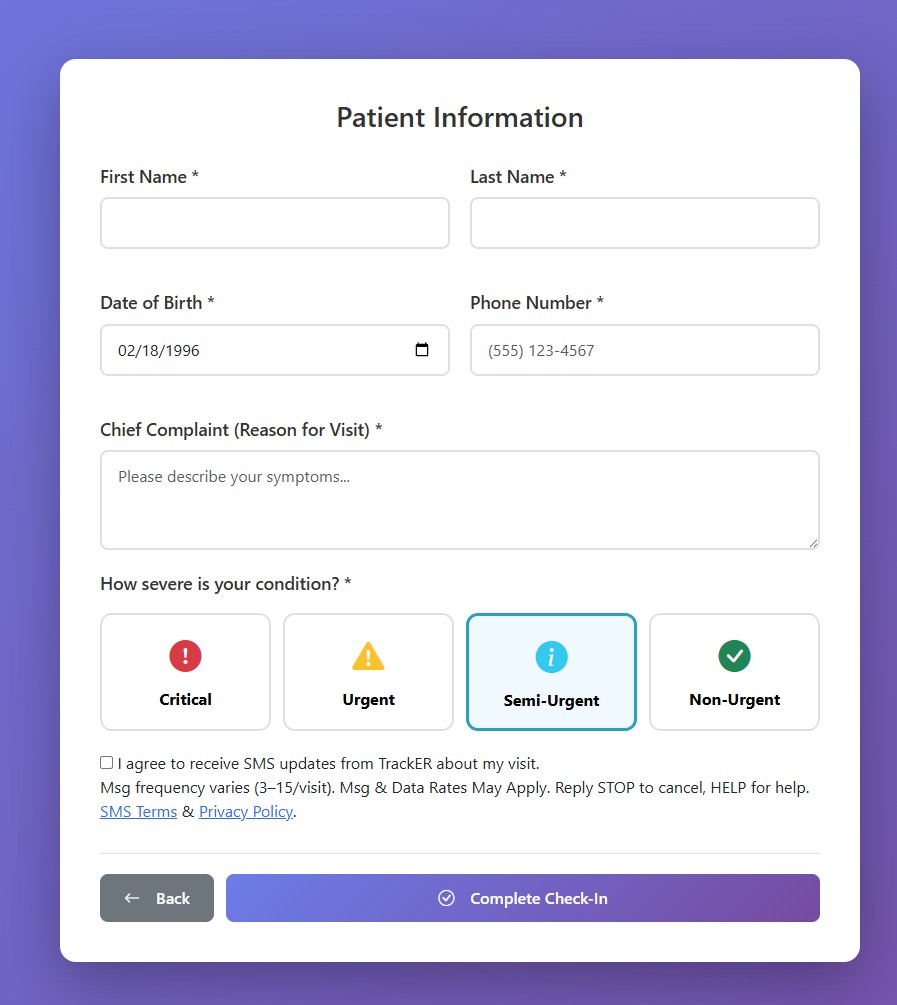
The SMS opt-in checkbox is presented during patient check-in. It is unchecked by default and requires active consent.
The patient cannot complete check-in without checking this box. If the box is unchecked and the patient attempts to submit, a validation error states: “Please agree to receive SMS notifications to continue.”
Method 2: Hospital Staff Registration
When hospital reception staff register a patient on behalf of the patient:
- The staff member verbally asks: “May we send you text message updates about your visit? Standard message and data rates apply. You can reply STOP at any time.”
- The staff member checks the SMS consent checkbox in the registration system only if the patient verbally agrees
- The consent and timestamp are recorded in the patient’s visit record
Method 3: Employee Enrollment
Hospital employees (nurses, support staff, security) who receive safety and operational alerts:
- A hospital administrator adds the employee’s phone number to TrackER
- The employee receives an initial verification SMS: “TrackER: Your hospital has enrolled you for safety alerts. Reply YES to confirm. Msg & Data Rates May Apply. Reply STOP to opt out, HELP for help.”
- The employee must reply YES to confirm enrollment
- Only after confirmation does the employee receive alerts
- The employee can also enable/disable specific alert types in the Staff Portal → Settings → Notifications
What Messages You Will Receive
Patient Messages
- Visit status updates (e.g., “Your status has been updated to: Triage Complete”)
- Room assignment notifications
- Discharge information and next steps
- Heartbeat messages during long waits (e.g., “You’re still in the queue. We haven’t forgotten you.”)
Employee Messages
- Security alerts (STAMP RED-level threat assessments)
- Buddy system warnings (staff safety when entering flagged rooms)
- Critical job dispatches (urgent transport/equipment requests)
- Multi-factor authentication codes for login
Sample Messages
Patient visit update:
TrackER: Your status has been updated to: Room Ready. Please proceed to Room 4B. Reply STOP to opt out. Msg&Data rates may apply.
Employee safety alert:
TrackER ALERT: STAMP RED — Room 7A. Do not enter alone. Security notified. Reply STOP to opt out. Msg&Data rates may apply.
MFA verification code:
TrackER: Your verification code is 847291. This code expires in 5 minutes. Reply STOP to opt out. Msg&Data rates may apply.
Message Frequency
The number of messages varies based on usage:
- Patient visit updates: Typically 3–15 messages per emergency room visit, depending on visit complexity and duration
- Employee safety alerts: As-needed based on security events; frequency varies by role and shift
- MFA codes: 1 message per login attempt when MFA is enabled
Message and Data Rates
Important Notice
Message and data rates may apply. Standard text messaging rates from your mobile carrier will apply to all messages sent and received. TrackER does not charge for SMS notifications, but your carrier may charge per-message or data fees depending on your plan. Please check with your mobile carrier for details.
Supported Carriers
TrackER SMS notifications are supported on all major U.S. mobile carriers, including but not limited to:
- AT&T
- Verizon Wireless
- T-Mobile
- Sprint
- U.S. Cellular
- Metro by T-Mobile
- Boost Mobile
- Cricket Wireless
- Virgin Mobile
Carriers are not liable for delayed or undelivered messages.
How to Opt-Out (STOP)
You can stop receiving SMS notifications at any time:
Option 1: Reply STOP
Text STOP to any TrackER message. You will receive one final confirmation: “TrackER: You have been unsubscribed and will no longer receive messages. Reply START to re-subscribe.”
Option 2: Patient Portal Settings
- Open the TrackER patient tracking link on your phone
- Go to notification settings
- Toggle off SMS notifications
Option 3: Staff Portal Settings (Employees)
- Log in to the Staff Portal or Nurse Portal
- Go to Settings → Notifications
- Toggle off SMS alert types individually or set status to “Unavailable”
Option 4: Inform Hospital Staff
Ask any nurse, registration staff member, or hospital administrator to disable SMS notifications for your visit or employee account.
After Opt-Out
Once you opt out, you will no longer receive any SMS messages from TrackER. Patients can still track their visit status by keeping the patient portal web page open. Employees should monitor alternative communication channels per hospital policy. You may re-subscribe at any time by texting START.
Help (HELP)
Text HELP to any TrackER message to receive: “TrackER by CCB Tech. For support, contact your hospital front desk or visit ccbtec.com/tracker-sms-opt-in.html. Msg&Data rates may apply. Reply STOP to unsubscribe.”
You may also:
- Ask hospital staff at the registration desk or nursing station
- Email: support@ccbtec.com
Privacy & Data Protection
Your phone number and all messages are protected under HIPAA regulations. We do not sell, share, or rent your phone number or message data to third parties for marketing or promotional purposes. Your phone number is used solely for the purposes described in this document.
For complete details, please review our Privacy Policy and Terms and Conditions.
Emergency Contact Information: If you are experiencing a medical emergency, call 911 immediately. SMS notifications are for informational purposes only and are not monitored for emergency requests. TrackER is not a replacement for direct clinical communication. By opting in, you consent only to the message types described above. No purchase is required to use TrackER.